Start with the schedule you already use.
Bring in Sling schedules or use the built-in scheduler. Configure Google Drive route folders and multiple filename keywords for each station.
AMZL, AMXL, MMRO, and RSR station workflows
Built for delivery service partners
Give dispatch, fleet, and your drivers one place to stay in sync. DSP Operations System connects the daily work so you can spend more time leading your operation.
Built by an operations manager. Tested in real delivery operations.
Why we built itSee the work come together
Plan the day, see what is ready, and put clear instructions in front of your team.
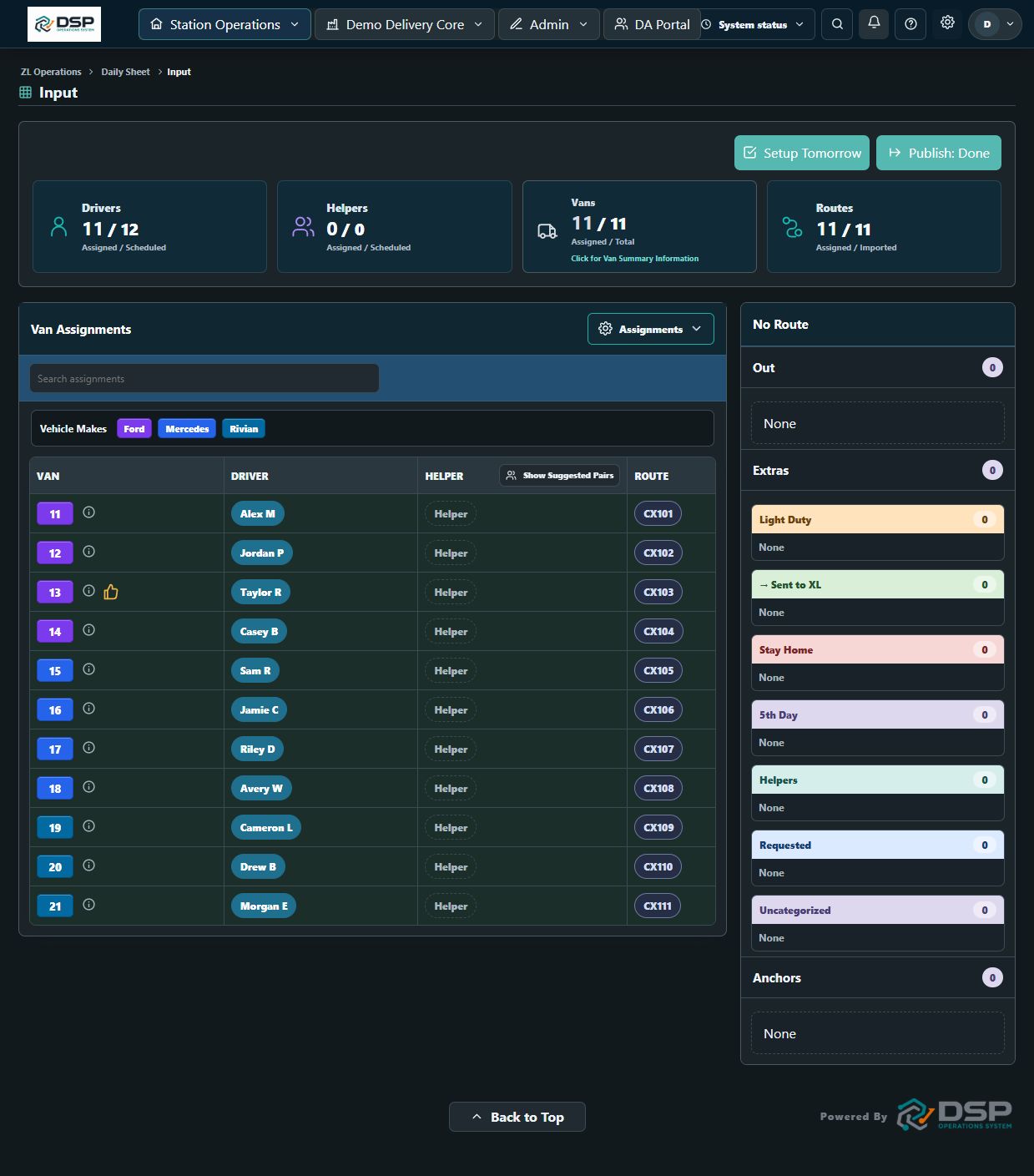
Bring scheduled drivers, available vehicles, and imported routes together. Make assignments and keep the next move visible to dispatch.
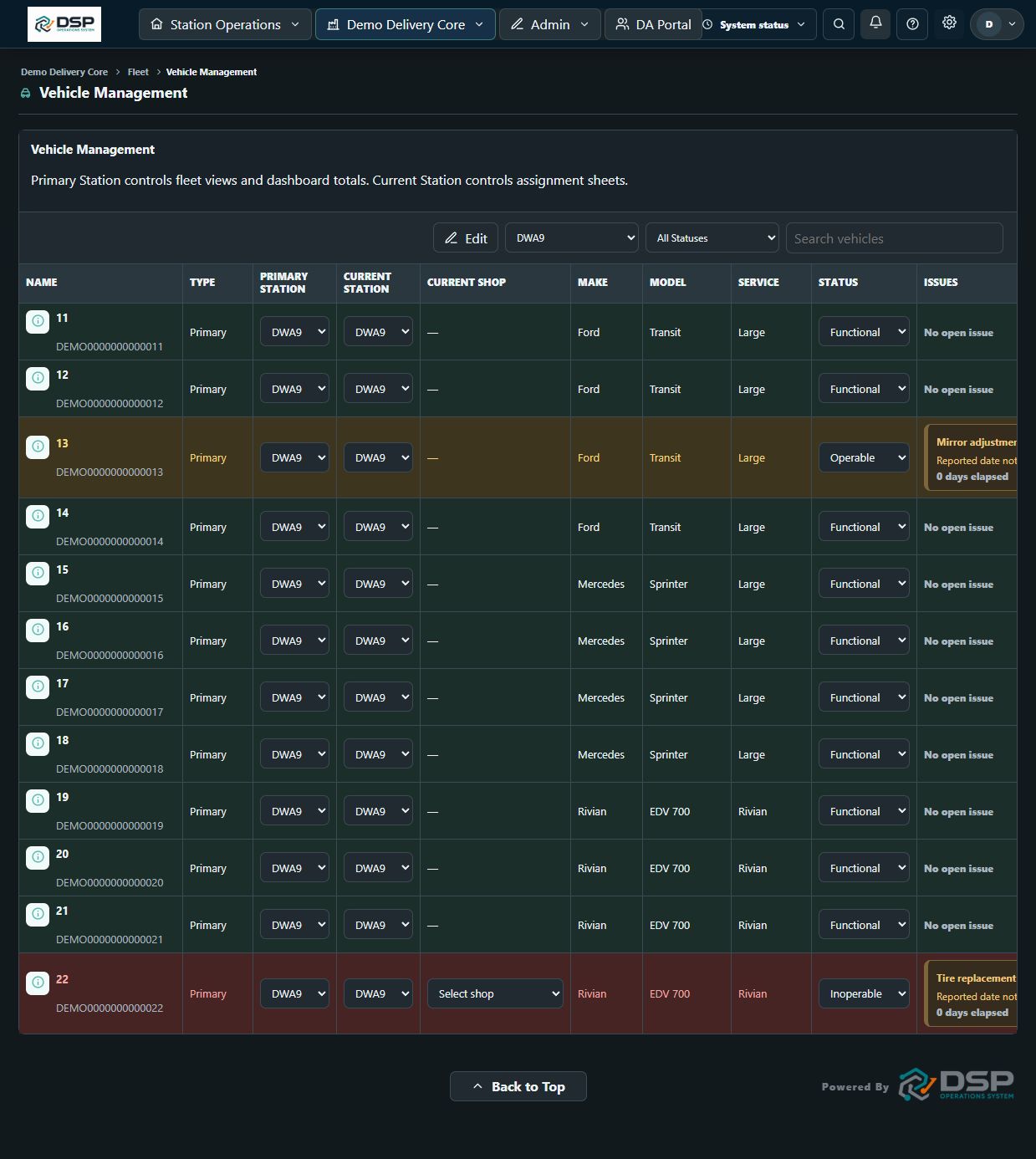
Keep vehicle status, reported issues, and repair plans together so your team can follow up with the right context.
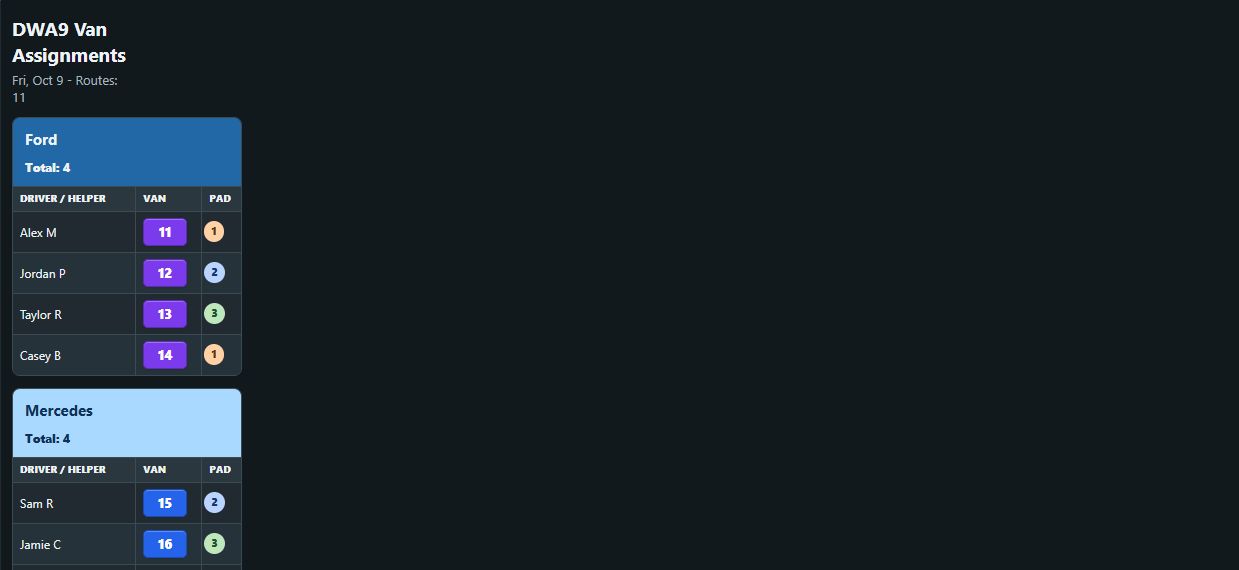
Choose the columns your station needs from assignments and imported route data. Display the published page on its own or in a slideshow.
Create printable vehicle QR sheets with the VIN in a fixed position and your station’s chosen forms in the remaining spots.
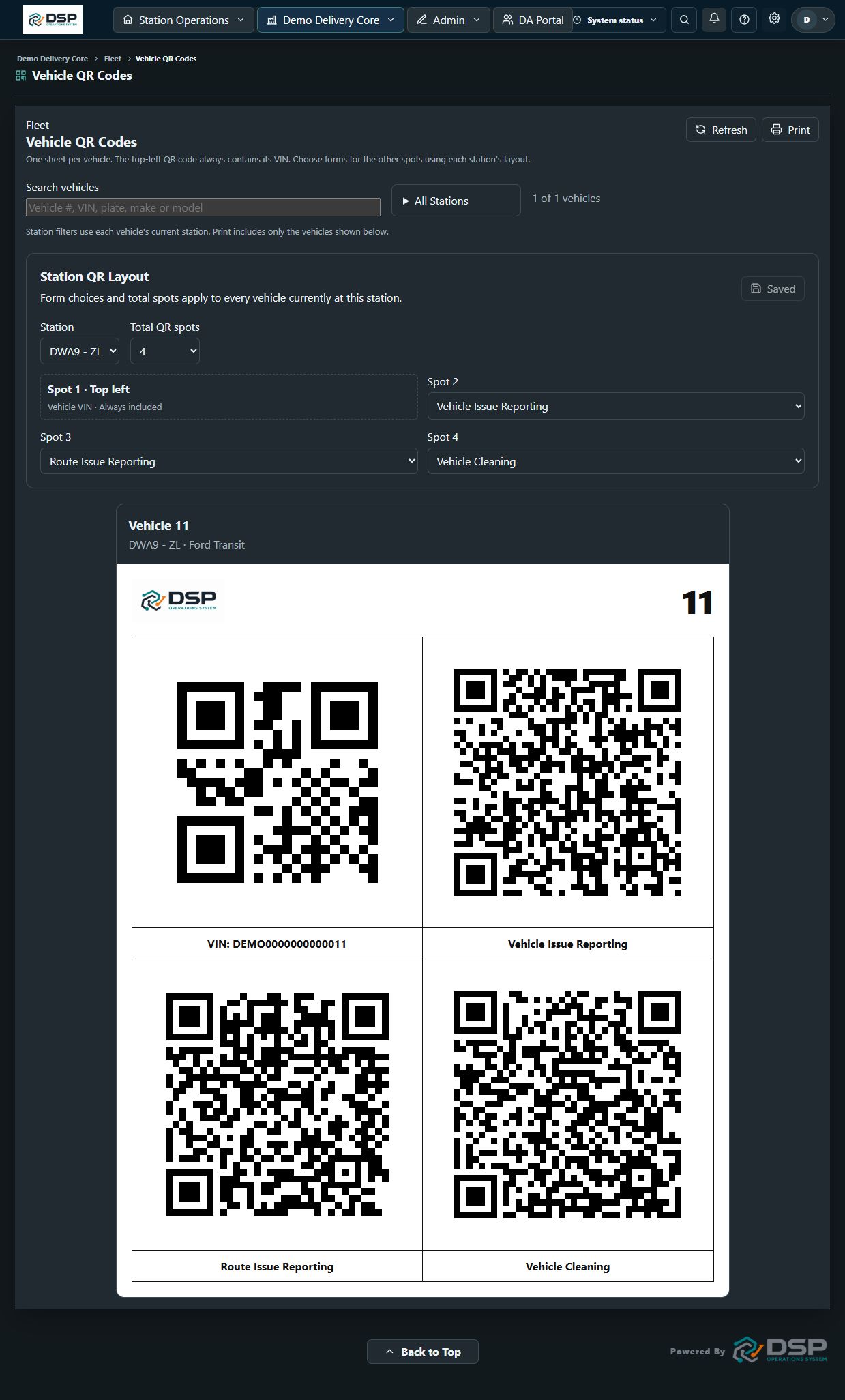
Product images use fictional demonstration data. Available views and fields depend on station configuration.
Built around the work
Keep the tasks that shape your day connected—from schedule imports to the report that still needs a signature.
Bring in Sling schedules or use the built-in scheduler. Configure Google Drive route folders and multiple filename keywords for each station.
AMZL, AMXL, MMRO, and RSR station workflows
Connect route downloads and supported wave plans to assignments. Keep staging, wave times, bags, overflow, and packages with the route.
MMRO trip matching, arrival times, and trip stage
Collect incident and injury reports and request DA signatures. Choose email or Slack folder delivery by station, with the Slack report updated after signing.
Submission and delivery settings in one place
Build custom forms, review responses, and give your team QR access. Manage vehicle issues, cleaning reports, and uniform requests alongside daily operations.
Printable vehicle QR sheets with station-specific forms
Use station checklists and handoff notes to capture what happened, what is still open, and what needs the next manager’s attention.
Shared context across shifts
Bring scorecards, proofing, coaching status, and weekly recaps into the same workspace your managers use to run the day.
Performance review beside operational context
Keep associate records in Core and give DAs access to their portal for schedules, messages, and shift exchanges. Control access by user.
Manager tools and driver access, connected
Use the Slideshow Builder and Viewer for text, images, video, counters, Pro Tips, and birthdays. Add published standby screens and choose the stations you display.
Useful updates and team recognition
Edit your public homepage with photos, video, feature sections, and contact forms. Preview changes and publish when you are ready.
A branded company website, managed from your workspace
Track uniform quantities and sizes, get low-stock notifications, fulfill requests, and handle returns and damaged items in one workflow.
Inventory, requests, and returns connected
Connect the tools in your operation
The full feature directory
Explore the tools available across the platform, from your public company website to the uniforms on your shelves.
Click a feature to learn more.
Bring each station's daily work into its own dashboard. Daily sheets adapt to the assignment needs of AMZL, AMXL, MMRO, and RSR operations.
Put people, vehicles, and routes together on one assignment board. Dispatch can see who is assigned and what is still available as the plan changes.
Prepare the next day's sheet with a guided workflow and bring in scheduled associates. This keeps tomorrow's staffing plan close to the assignments it supports.
Use Auto Assign at enabled stations to help build the initial assignment plan. Managers can review and adjust the results before publishing.
Keep preferred vehicles and helper pairings alongside assignment planning. Station-specific preferences give dispatch useful context when building the day.
See scheduled people and staffing exceptions in the same workflow. Track extras, call-outs, anchors, and light-duty needs when deciding who goes where.
Bring route data into the assignment sheet, keep recurring routes available, or enter routes manually. Dispatch can connect the route plan to the people doing the work.
Choose which assignment and imported route columns your team sees. Publish a readable daily sheet for a display, open it fullscreen, or print it.
Record daily equipment and readiness checks and return to saved records. Keep checklist and rostering work connected to the station's daily routine.
Prepare morning announcements for your team and use the dedicated XL Seattle / Bellevue tracker. Keep station-specific information within the daily operation.
Plan shifts in the built-in scheduler and Master Schedule, or import the schedule your team already maintains in Sling. Keep staffing visible alongside daily operations.
Narrow the schedule to a station, position, or employee. Managers can focus on the people and shifts relevant to the decision they are making.
Publish scheduled shifts and notify employees of schedule changes. Give your team a clear way to see the current plan.
Review time-off requests, record approval decisions, and set blackout dates. Keep availability decisions within the scheduling workflow.
Record business closures and share schedule notices. Keep exceptions visible to the people who plan and work those days.
Review route volume by station, date range, and service type. WWG2 can have its own counts without being included in the all-stations total.
Read route-count information from supported screenshots and use forecasting and hiring-needs calculations to support staffing plans. Review the imported data before relying on the plan.
Set a route-file folder and multiple filename keywords for each station. Import the relevant downloads without making every station use the same naming convention.
Import supported wave-plan PDFs to capture staging, wave time, bags, overflow, and package totals. Match the route number to the route download so the details follow the correct assignment.
Use MMRO Trips data to connect driver names and route codes to assignments. Keep the driver's earliest arrival time for the day and the trip stage, including canceled trips.
Keep primary and rental vehicles in one fleet workspace. Review the vehicle details your dispatch and maintenance teams need to make daily decisions.
Track a vehicle's home station and where it is currently operating. Filter by station and vehicle characteristics to focus on the part of the fleet you need.
Review incoming vehicle reports and past issues together. Managers can understand what has already been reported before deciding on the next action.
Record a repair plan and the next step for a vehicle issue. Keep repair shop information nearby so follow-up does not depend on a separate contact list.
Use maintenance views to review fleet follow-up and track LSC cases. Keep case information connected to the vehicle work that needs attention.
Bring Pave inspection information and vehicle-cleaning reports into fleet follow-up. Give managers a place to review vehicle condition and cleaning records.
Use the Parking Map to organize vehicle parking information. Give the team a visual reference when coordinating vehicles at the station.
Create a QR sheet for each vehicle with its VIN code fixed in the top-left spot. Choose four to six total spots and select the remaining form codes separately for each station.
Search for a vehicle or select one or more stations, then print the matching QR sheets. Prepare the sheets you need without printing the entire fleet.
Track company phones, their condition, and repair needs. Keep equipment follow-up in the same workspace as the vehicles and teams using it.
Use dedicated audits for fleet, charging bricks, and gas cards. Record checks and review findings as part of equipment accountability.
Build forms for your company's workflows and manage them from one place. Collect information in a consistent format instead of recreating the same request each time.
Share a form through a direct link or QR code. Put reporting access where employees need it, including on vehicle QR sheets.
Review submitted responses, export records, and configure retention settings. Keep the information your team collects organized for follow-up.
Give employees dedicated ways to report vehicle issues, route issues, and vehicle cleaning. Keep submissions tied to the relevant operational workflow.
Collect incident and injury details, request the DA's signature, and produce a PDF report. Follow the report from the initial submission through signing.
Choose report delivery by station, using email or a configured Slack folder. Send completed email reports and make Slack reports available before the DA signs.
Keep the Slack report current when the DA completes the signature. The delivery workflow updates the earlier report with the signed version.
Use dedicated DA Auditing and DNR Protection forms to collect the information those workflows require. Review submitted records with your other forms.
Collect Pro Tips from your team through a submission form. Use practical suggestions from the field to support shared learning.
Provide separate uniform request paths for new and existing DAs, plus a return form. Keep employee requests connected to uniform management.
See how many uniform items you have by size and category. Give the team a shared inventory reference before promising an item to an employee.
Configure the sizes used by your uniform inventory. Keep item options aligned with the stock your company actually carries.
Adjust quantities as stock arrives or inventory changes. Keep the available count useful for the next person reviewing a request.
Receive low-stock notifications so replenishment needs are easier to notice. Use current quantities to decide what to order next.
Review uniform requests and filter them by station. Focus on the employees and requests your team is responsible for fulfilling.
Fulfill uniform requests using the inventory workflow. Keep issued items and stock quantities connected instead of updating separate lists.
Record returned uniforms and identify damaged items. Keep returns and condition information part of inventory follow-up.
Maintain associate records in Core with station, role, and status information. Give managers a shared reference for the people in the operation.
Bring associate records in through imports and export information for review. Reduce repeated entry when setting up or maintaining the roster.
Use Add New DA to enter an associate and begin initial scheduling. Keep onboarding information close to the systems managers use each day.
Work through associate offboarding in the app. Keep the departure process connected to the employee record and operational follow-up.
Track associates on active light duty so managers can account for their status. Keep that context visible when reviewing staffing and assignments.
Give each DA a portal with their own dashboard and schedule. Employees can check the information relevant to their work without using manager screens.
Let employees submit time-off requests and see their status. Managers can review the requests through the scheduling workflow.
Let employees review available shifts and use shift offers and exchanges. Keep shift changes within a shared workflow rather than scattered messages.
Support direct and group conversations in the DA Portal. Keep team communication available alongside schedules and employee tools.
Share team posts and announcements and support push notifications. Give employees a place to find updates relevant to the operation.
Review work anniversaries and recognize birthdays. Bring employee milestones into manager reports and station display content.
Manage supported Sling messaging workflows from the operations workspace. Keep schedule-related communication near the daily work it supports.
Use the DSP OS Messaging Center for application messaging. Managers can work with team conversations without leaving the operations tools.
Reuse message templates and configure automated replies for supported workflows. Keep recurring communication consistent while reducing repeated typing.
Create and review progress report chats, monitor activity, and return to report history. Keep follow-up visible across the day.
Use handoff pages designed for Ops Manager, Ops / Lead, and Ops / Closer responsibilities. Capture the context the next person needs to continue the work.
Organize handoff notes by category and track which notes have been read. Keep unresolved information easier to find across shifts.
Organize shared access folders for your team. Keep frequently needed resources within reach from the company workspace.
Review application notifications and use workspace search to find relevant information. Give managers a starting point for updates and follow-up.
Import ZL scorecard data and review performance in the app. Keep scorecard review near the other tools managers use to follow up with their team.
Review proofing information and track coaching status. Make it easier to see which performance follow-ups still need attention.
Review Weekly Recap information and export station assignments. Keep daily staffing and assignment records available for management review.
Track weekly extras alongside station operations. Give managers a way to review this part of the staffing picture over the week.
Create work anniversary reports and PDF output. Prepare employee-recognition information in a format that can be reviewed or shared.
Create custom checklists and produce printable reports. Support company-specific routines while keeping records in the same workspace.
Generate a report of form links and QR codes. Give your team a convenient reference for the reporting tools available to them.
Build and save multiple slideshow decks for different stations or purposes. Arrange content in one place before opening it on a display.
Open a saved slideshow in the Viewer for a dedicated screen. Present team information without leaving the builder open for editing.
Combine written updates, photos, video, and counters in a deck. Choose the slide type that fits the information you want to communicate.
Add Pro Tips to a slideshow so useful reminders can appear between other updates. Bring field knowledge into the station's daily display.
Choose the stations whose birthdays appear. Show that day's employees by their Sling names, fading them in one at a time before holding the completed slide.
Adjust slide timing and visual options such as colors and text position. Make the deck fit the pace and viewing conditions of the station.
Choose standalone or split display layouts for supported screen content. Adapt the presentation to how the screen is used in your operation.
Select a station's published standby screen for a slideshow or standalone display. Keep assignment information available when the screen is waiting between other content.
Set the hours when company slideshow screens stay active and refresh. Align screen operation with the times your team uses the space.
Give your company a public homepage at its company web address. Manage that presence from the same system used for daily operations.
Edit page text, buttons, and feature cards directly in the builder. Shape the message around your own company without maintaining a separate page-editing workflow.
Build the page from supported section types, including media, contact, and calls to action. Choose the content that helps visitors understand your company.
Use galleries and carousels to show multiple photos. Give visitors a visual introduction to the team, workplace, or services you choose to highlight.
Choose colors and section styles and arrange the order of the page. Keep the site aligned with your company's branding and message.
Work on a private draft with autosave, preview the result, and publish when ready. Review changes before they become part of the public page.
Configure a contact form for the company page. Give visitors a clear way to provide the details you need for follow-up.
Share the company website using its link or QR code. Make the page easy to reach from print materials or other communications.
Connect Sling schedules and choose the positions each station imports. Keep staffing imports aligned with the work that belongs at that station.
Import supported route downloads and wave-plan files from configured Google Drive folders. Bring route details into station assignments without retyping each value.
Synchronize Core associate information with Google Contacts and the Associate List spreadsheet. Keep configured external records aligned with the app's roster.
Configure Slack reports for daily operations and available vehicles. Put recurring operational information in the channel your team uses.
Send configured manager handoff summaries to Slack. Keep the next shift's context available where managers review team updates.
Deliver supported vehicle issues and incident or injury reports through Slack. Update report delivery as the signing workflow progresses.
Configure which stations, channels, recipients, and times apply to supported integrations. Tailor delivery to the people responsible for each operation.
Use a separate company workspace with its own subdomain and tenant data. Give your team a consistent address for accessing the application.
Work through guided setup and use import templates for company information. Bring existing records into the system with a structured starting point.
Set company branding and application logos. Make the workspace recognizable to the employees using it each day.
Manage station workspaces and configure station-specific behavior. Support multiple operations without forcing every station to use identical settings.
Invite users, assign roles, and manage page access. Give people access to the parts of the application relevant to their responsibilities.
Let users choose their default home page and appearance. Make frequent tasks easier to reach and adapt the app to personal viewing preferences.
Choose colors for assignment positions and vehicle decals. Make familiar visual cues part of the daily assignment workflow.
View estimated storage use for saved company app data and uploaded media. See how much of the storage allowance is being used.
Check system status, report bugs, and submit suggestions. Review feedback history as issues and requested improvements move through follow-up.
Availability depends on station type, user permissions, and configured integrations. The Landing Page Builder is available to company owners.
Experience behind the software
DSP Operations System was built by an operations manager and tested in real-world delivery operations.
It is shaped by the work that actually fills the day: getting assignments ready, finding an available van, chasing a report, and making sure the next shift knows what is going on.
That experience shows up in the details—from station-specific settings to printable vehicle QR sheets and published dispatch screens.
Explore what the platform can doYour company. Your workspace.
After purchase, your primary administrator receives a secure setup link for your company’s own subdomain.
Set up stations and branding. Use guided templates to import associates, vehicles, and repair shops.
Add users, choose their access, and configure the pages and station workflows your team will use.
Company subscription
Give your team one place to plan, report, and follow through. New client subscriptions are temporarily closed, but you can explore the platform and check back for availability.
The platform behind your operation
We are not accepting new clients at this time. Existing clients can sign in below.
Existing client? Open your workspace →A few things to know
Yes. Manage multiple station workspaces with station-specific settings, imports, forms, and published displays. AMZL, AMXL, MMRO, and RSR workflows are supported; available fields and import formats vary by station type.
Yes. Your company gets its own subdomain and separate data workspace. Administrators manage your users, branding, stations, and access.
Guided setup includes import templates for associates, vehicles, and repair shops. Schedule and route imports use the supported formats and integrations configured for your stations.
The web app works on desktop and mobile. Published daily sheets and slideshow displays give your team a shared view on a dedicated screen.
DSP Operations System connects to those services using your own accounts. You will need the appropriate accounts, permissions, and connection settings. Third-party subscriptions are separate.
New subscriptions are temporarily closed. Existing clients can continue signing in to their company workspace. Please check back for future availability.
Company provisioning creates your workspace and a secure setup link for the primary administrator. From there, configure your company, import data, and invite the team.
Already part of the team?
Use the subdomain from your company setup email.